The good news is that if you use Masbi Portal, the cryptocurrency payment feature is already available for you, and you can easily activate it.
How can the site admin enable cryptocurrency payment on the site?
The site admin must first enter multiple addresses of the desired coins in the admin user panel. (We recommend Dogecoin because it has low transaction fees).
Adding wallet addresses is not done from the site management panel, but must be done from the user panel of the account recognized as the admin.
To do this, go to the main page of the site, click on your name at the top, then click Edit Wallet.
Then click Add Address to open the following form.
In the form, enter the Currency Name, Wallet, and Address. Repeat this form at least 50 times to register different addresses. If an error occurs while registering an address, it may be due to internet issues, as the validity of the address is checked through a trusted site at that moment.
Important note about Private Key
You must keep the private key of all the addresses you register beforehand.
Why? Because if a customer pays to one of these addresses, only with the private key of that address can you withdraw the cryptocurrency and transfer it to your exchange or main wallet.
🔐 The responsibility for keeping private keys is entirely yours.
How to generate multiple addresses with private keys?
To do this, visit https://www.walletgenerator.com/?currency=Dogecoin.
After opening the site, disconnect your internet (for extra security, the site works offline as well).
The image below shows how you can generate multiple Dogecoin addresses along with their private keys at once using this site.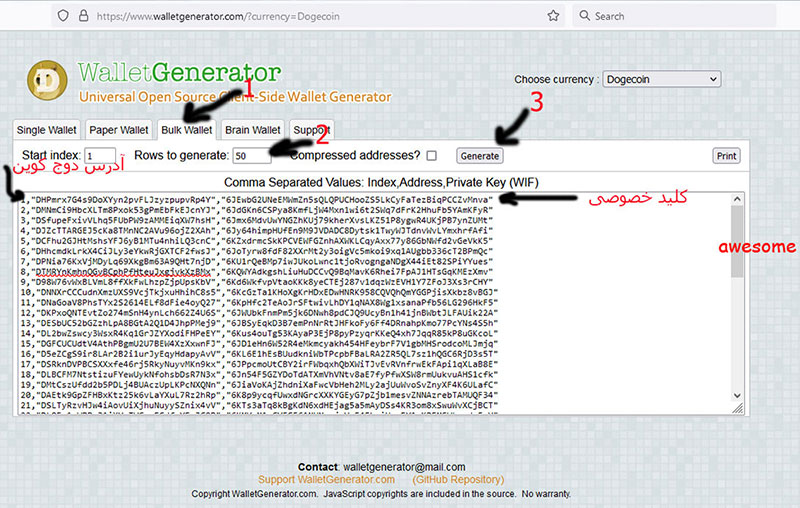
These addresses and their keys are randomly generated, and no user anywhere in the world can generate exactly the same addresses.
Each line contains one Dogecoin address and the private key associated with that address.
Once the addresses are generated, select all of them and save them in a Notepad file and keep it in a safe place.
⚠️ Security Warning:
1. The file must not be lost or shared with anyone else.
2. Never upload the file to your site.
When can users pay with cryptocurrency?
Cryptocurrency payments on Masbi Portal are possible under the following conditions:
1. Change the site language to English
If the user selects English as the site language, the option to pay for orders with cryptocurrency will be enabled for them (this is suitable for international users).
2. Restrict specific users to crypto payment
The site admin can configure certain users to only make payments via cryptocurrency.
3. Restrict specific products to crypto payment
The admin can make some products only payable with cryptocurrency.
Cryptocurrency payment process from the customer's perspective:
During payment, the system randomly assigns one of the addresses you registered to the customer.
That address is shown to the customer, and the customer transfers the amount to that address.
After the payment, the system automatically detects the transaction and confirms the payment.